
Cocobi Baby Care - Babysitter
KIGLEEducational
3.896.00 Reviews
- Version
- 1.0.33
- Installs
- 10.00M
- Age Rating
- Everyone
Screenshots
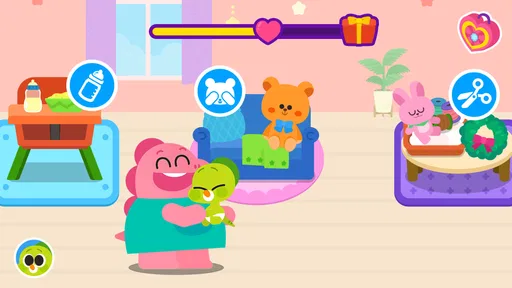
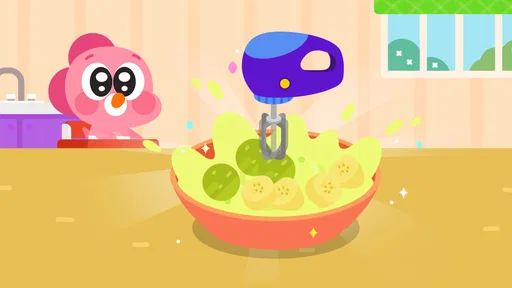

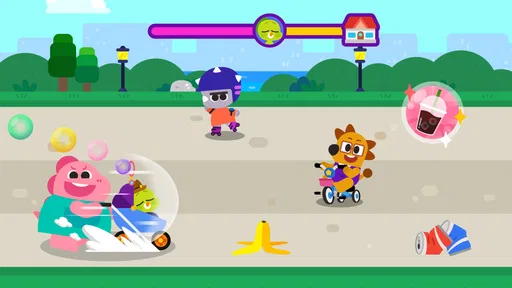
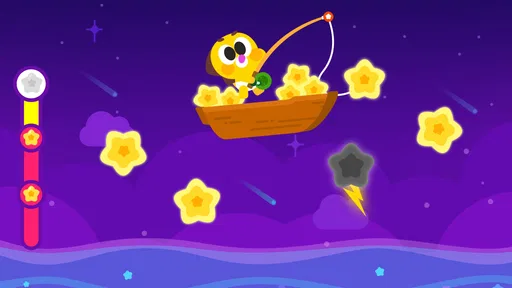
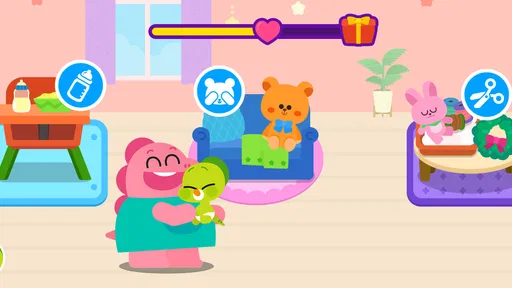
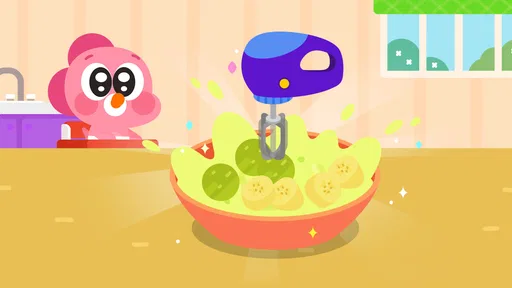

Our Review of Cocobi Baby Care - Babysitter
 Analysis by Appyee
I found Cocobi Baby Care - Babysitter most interesting as a short, gentle activity for young children rather than as a traditional game with goals, competition, or a long progression system. It comes from KIGLE and sits in the educational game category, using dinosaur characters and baby-care situations to give children simple tasks to explore. The free entry point makes it easy for a parent to try, although optional purchases cost $1.99 per item.
My first impression was that its appeal depends less on challenge and more on the feeling of looking after a friendly character. That makes it suitable for children who enjoy pretend play, repetition, and colorful touch interactions. It is aimed at Everyone, and the game is available for devices running Android 7.0 or later. I would introduce it as a supervised, occasional activity, especially for a child who likes dinosaurs but may not yet be ready for reading-heavy educational apps.
What the first play session feels like
The easiest way to understand the game is to treat it like a digital babysitting routine. A child is invited to interact with dinosaur friends and respond to their needs through straightforward touch actions. The experience is less about discovering a complicated rule system and more about recognizing what the character needs, choosing an action, and seeing an immediate reaction.
That simplicity is a strength for younger players. A child does not need to remember a large set of controls or understand a complex objective before starting. I also like that the dinosaur theme gives the activities a clear identity. Many early-learning games use generic animals or brightly colored objects; here, the dinosaur friends provide a reason for children who already love prehistoric creatures to stay interested.
At the same time, parents should set expectations correctly. This is not the best choice if you want structured lessons in letters, numbers, spelling, or problem solving. Its educational value comes mainly through pretend-care routines, attention, sequencing, and basic interaction. Those are worthwhile skills, but they are different from the measurable learning path offered by a dedicated phonics or mathematics app.
Where children and parents can get stuck
The first point of friction is usually not difficulty in the usual gaming sense. It is knowing what the game expects the child to do next. A young player may tap repeatedly, move too quickly between activities, or lose interest if the visual prompt is not immediately clear. I found that sitting beside the child for the first session is more useful than simply handing over the phone and expecting independent play.
A short demonstration can make a big difference. I would show the child one complete interaction, then let them repeat it without taking the device back. This keeps the adult from becoming the person who performs every action while the child watches. It also reveals whether the child understands the visual cues or is only tapping randomly.
Another possible sticking point is repetition. Care-themed games often rely on familiar actions, and that can be comforting for a preschooler but boring for an older child. If your child asks for a game with levels, missions, or a stronger sense of progress, this title may feel too light. The average rating of 3.7 from around 7,400 ratings suggests that the experience will not suit every family equally, even though it has passed ten million installs.
Simple setup checks before handing it over
Because the game is free to start, I would install it before a planned quiet moment rather than during one. Open it yourself, check that the first interaction responds properly, and make sure the device has enough battery for the intended session. This is basic preparation, but it prevents a child from associating the game with waiting, repeated restarts, or an adult searching through settings.
The version listed for the game is 1.0.32. If the app behaves unexpectedly, the first sensible step is to check whether the installation is current through the normal app store process. I would avoid immediately deleting the game, particularly if a child has already begun using it, because removing an app can also remove local progress depending on how that particular device handles app data.
It is also worth checking the device itself. Android compatibility starts at version 7.0, so an older phone or tablet may not be a suitable place to run it. On a supported device, close other demanding apps before starting if the game feels slow. This does not add any new feature, but it reduces the chance that background activity is competing for memory or processing power.
For a child, the most important setup is physical rather than technical. Use a stable surface, keep the screen at a comfortable distance, and decide the session length before play begins. A short routine works better here than leaving the game open indefinitely. I prefer using it after a real-world care activity, such as tidying toys or preparing a snack, because the pretend-care theme can then connect to something the child already understands.
Recovering when an interaction stops making sense
When a child says the game is not working, I would first ask what they expected to happen. “It is broken” can mean several different things: the character did not react, the child missed a visual cue, the screen did not register a touch, or the child simply wants to return to a previous activity. Separating those possibilities avoids unnecessary troubleshooting.
If a tap is not registering, try a deliberate single tap rather than repeated touches. Wipe the screen if it is dirty, remove anything covering the display, and check whether the device is responding normally in another app. If the entire device is sluggish, the problem may be the phone or tablet rather than the game. Restarting the device is a reasonable general step, but I would save more disruptive actions for later.
If the game responds but the child cannot continue, pause and repeat the last action slowly. Young children often press several areas at once, especially when excited. Taking the device back and completing the whole sequence yourself can make the problem worse because the child learns to wait for an adult. Instead, point to the relevant area, name the action in simple words, and let the child try again.
Should the app close suddenly, reopen it once and see whether the issue repeats. If it happens repeatedly, check available storage, confirm that the operating system is supported, and close other apps. I would not promise that these steps solve every crash, but they are safe first checks that do not require changing advanced settings or installing anything else.
Purchases deserve a little attention as well. The game is free, but optional in-app items are priced at $1.99 each. I would configure the device so a child cannot approve purchases casually, and I would explain that the free starting experience is the boundary of what they can use without asking. This is especially important in a game designed for young children, who may tap attractive options without understanding that they lead to a paid item.
When the app is not the cause
Not every disappointing session points to a technical fault. A child may be tired, hungry, overstimulated, or simply finished with the activity. Because the game uses a calm care-play concept, it can look like a good choice for any quiet moment, but even a gentle game will fail to hold attention when the timing is wrong.
I would also consider the device’s touch behavior. A thick screen protector, a cracked display, wet fingers, or a case that overlaps the edge can make simple taps feel unreliable. Test the same area with another child-friendly app before blaming this one. If other apps show the same problem, repair or clean the device instead of repeatedly reinstalling the game.
Sound can affect the experience too, even when the visual interaction is working. Check the hardware volume, silent mode, and any connected headphones. A child may interpret missing audio feedback as a failure to advance. If the game is being used in a quiet public place, I would mute the device in advance and explain the visual response so the child does not keep tapping to search for a sound.
Some children also need more direct guidance than parents expect. Pretend play is not automatically obvious to every child. If your child prefers explicit instructions, demonstrate the care routine with a toy dinosaur first. Then the digital version becomes a familiar extension of play rather than an unexplained sequence of taps. This is one of the more useful ways to make the game work without turning it into a lesson.
How I would use it in an everyday routine
Imagine a child waiting while a parent finishes preparing dinner. I would set up a brief session beforehand, place the tablet where the child can use it safely, and agree that the game ends when the meal is ready. During the session, I would occasionally ask the child what the dinosaur might need next, without taking control. That small question turns passive tapping into observation and language practice.
Another useful approach is to use the game as a transition rather than a reward that lasts without limit. For example, a child could play after putting away a few toys and then move directly to washing hands. The care theme makes that transition feel connected, while the fixed stopping point prevents the game from becoming a source of negotiation every time an adult needs the device back.
I would not use it as a substitute for real caregiving conversations. The strongest value comes when the child talks about what the dinosaur is doing, imitates caring actions with a stuffed animal, or explains why a character might need help. Without that conversation, the educational element becomes much thinner and the game is mostly a colorful distraction.
Who will enjoy it, and who should choose something else
This game is a good fit for a young child who likes dinosaurs, responds well to visual prompts, and enjoys repeating familiar care activities. It can also work for siblings taking turns, provided the adults keep the turns short and make the interaction collaborative rather than competitive. The Everyone rating supports its broad family positioning, but parents should still judge whether the pace and content match their own child.
I would be less enthusiastic for an older child seeking challenge. There is little reason to choose a simple babysitting game over a puzzle, construction game, or subject-focused learning app if the child wants increasingly difficult tasks. Likewise, families looking for offline educational structure, detailed progress tracking, or a clear curriculum should compare it with apps built specifically around those goals.
It is also not my first recommendation for a child who becomes frustrated by unclear next steps. A more guided alternative with spoken directions or explicit menus may be better, especially if the child is playing without an adult nearby. The dinosaur theme is attractive, but theme alone cannot compensate for a mismatch between the child’s preferred learning style and the game’s gentle, exploratory format.
How it compares with familiar alternatives
Compared with a preschool learning app focused on numbers or letters, this game feels more like role-play than formal practice. That means it may be easier to introduce during free play, but it will not replace an app that deliberately builds recognition or early academic skills. Compared with a general virtual-pet game, the baby-care setting gives the play a more specific routine and a clearer reason to interact with the character.
Compared with a video, it asks the child to do something rather than only watch. That is a meaningful advantage when an adult wants a small amount of interactive screen time. However, a video is easier to start and may be less frustrating for a child who is tired. Compared with a physical dinosaur toy, the app provides immediate visual responses and a contained activity, while the toy offers more open-ended imagination and no battery or device concerns.
My practical advice is to choose this title when the child’s interest in dinosaurs is the bridge into pretend care. Choose a different app when the main goal is measurable school preparation, advanced challenge, or independent use with minimal adult help. It occupies a narrow but useful space rather than trying to cover every kind of early learning.
My practical verdict for families
KIGLE has made a free educational game that is easiest to appreciate in short, guided sessions. I like the dinosaur theme, the approachable care-play idea, and the way a parent can turn simple interactions into conversation about noticing needs and helping others. The game’s popularity is clear from its ten-million-plus installs, but popularity should not be confused with a universal fit.
The main friction is not advanced gameplay; it is managing expectations, device conditions, and a young child’s interpretation of simple interactions. Prepare the device, demonstrate one routine, supervise the first session, and treat unexpected behavior as a troubleshooting question rather than an immediate failure. Keep purchase controls away from casual taps, since individual optional items cost $1.99.
After using it, I would recommend Cocobi Baby Care - Babysitter to parents who want a light dinosaur-themed activity for pretend play and early everyday conversations. I would skip it for children who need a strong learning curriculum or substantial challenge. For the right age and mood, it is a pleasant little companion activity; its best results come when the screen supports real interaction instead of replacing it.
With a 3.7 average from around 7,400 ratings, the overall response is mixed enough to reinforce that balanced view. The current version, 1.0.32, is available at no upfront cost on compatible Android devices, with optional purchases handled separately. My final recommendation is to try it during a calm, supervised moment and judge it by the child’s engagement, not by the dinosaur theme alone. Its real strength is guided pretend play, not deep gameplay or formal instruction.
Privacy and Permissions
See what permissions an app requests and how it handles your data.
- Wi-Fi connection information
- view Wi-Fi connections
- Other
- view network connections, full network access, prevent device from sleeping
Verdict
Strengths of Cocobi Baby Care - Babysitter
- Simple tap controls are suitable for preschoolers.
- Colorful characters make routine tasks feel playful.
- Several baby-care activities offer variety between sessions.
- Gentle gameplay encourages empathy and nurturing behavior.
- Works well as a short, calming activity for young children.
Limitations of Cocobi Baby Care - Babysitter
- Some activities may feel repetitive after frequent play.
- Younger children may need help understanding task instructions.
- Progression is limited compared with larger educational games.
- Ads or purchase prompts may interrupt play, depending on the version.
- The app can require considerable storage on older devices.
Other Releases by KIGLE
View All
Cocobi Little Police - Kids
Educational3.8

Cocobi Life World - city, town
Educational3.9

Cocobi Hospital - Kids Doctor
Educational3.8

Cocobi Good Habits -Kid Toilet
Educational3.3
Similar Picks in This Category
View All
Little Panda Policeman
BabyBus4.0

Monster Trucks Game for Kids 2
Raz Games4.1

Little Panda's Chinese Recipes
BabyBus4.4

Little Panda's Restaurant
BabyBus4.4

Little Panda's Ice Cream Games
BabyBus4.3

Baby Panda Care
BabyBus3.8
Frequently Asked Questions
What is Cocobi Baby Care - Babysitter?
Cocobi Baby Care - Babysitter is a family-friendly childcare simulation game in which players look after adorable baby characters. You take care of everyday needs such as feeding, bathing, changing diapers, playing, and putting the babies to sleep. The simple controls, colorful presentation, and short activities make it suitable for young children, while also giving parents an easy-to-understand overview of the gameplay.
Is Cocobi Baby Care - Babysitter suitable for children?
The game is designed primarily for young children and preschool-age players, with uncomplicated tasks and cheerful cartoon visuals. Activities are generally easy to understand and do not require advanced reading or gaming skills. However, parents should still review the age rating and available content on the relevant app store, especially because suitability can depend on a child’s age, sensitivity, and ability to use a mobile device independently.
Does Cocobi Baby Care - Babysitter require an internet connection?
Many of the core babysitting activities can generally be enjoyed without a continuous internet connection once the game has been installed. An internet connection may still be needed for downloading the app, receiving updates, restoring purchases, or displaying certain advertisements and promotional content. Offline availability can vary by device version, so it is a good idea to test the game in airplane mode before relying on it during travel.
Is Cocobi Baby Care - Babysitter free to download and play?
Cocobi Baby Care - Babysitter may be available as a free download, but the exact pricing model can differ between Android and iOS and may change over time. Free versions can include advertisements, locked activities, or optional in-app purchases. Before allowing a child to play, parents should check the store listing, review purchase settings, and enable device-level parental controls to help prevent accidental spending.
Are there advertisements or in-app purchases in Cocobi Baby Care - Babysitter?
Depending on the version installed, the game may contain advertising or optional purchases that unlock additional content or remove limitations. This is especially important when the app is used by children, since colorful buttons and reward-based gameplay can encourage accidental taps. We recommend checking the app’s current store description and configuring parental approval, password protection, or purchase restrictions before handing the device to a child.
Play our best games!


